
The Privacy dashboard on Microsoft's website lists recent activity, e.g. visited sites or started applications, even if Activity History is disabled on a Windows 10 device.
Recent versions of Microsoft's Windows 10 operating system support a feature called Activity History that is keeping track of some of the things that users are doing on the device so that they may "jump back".
Activity History powers the operating system's Timeline feature. Timeline, which you may invoke with the shortcut Windows-Tab, displays a timeline view of activity when opened.
Only some applications such as Microsoft Edge or Office applications support it at the time. The main idea behind the feature is to display a history to users similarly to browsing histories of web browsers.
It is easy to go back to a particular application or re-open a website using the feature.
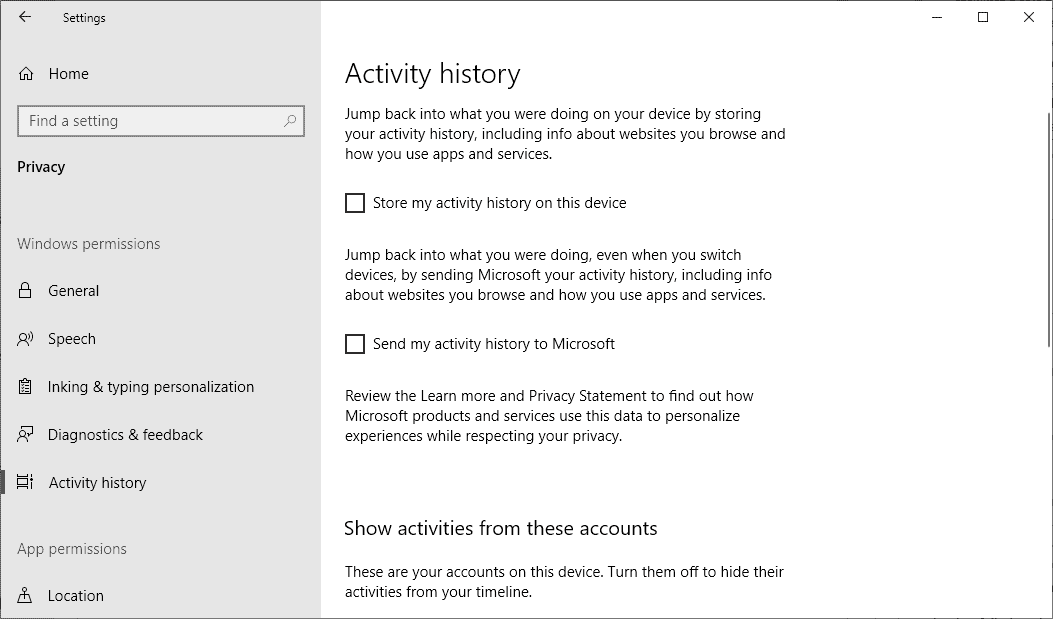
Three main options are exposed to users and administrators in the Settings application:
- Store my activity history on this device.
- Send my activity history to Microsoft.
- Show activities for specific accounts.
The first keeps track of activity on the device, the second sends it to Microsoft.
Even if you disable all three options in Settings, activity may be listed on Microsoft's Privacy Dashboard website on the company's account.microsoft.com site.
A user on Reddit noticed this and published a question on the site about the issue. Sign in was done with a local account and a Microsoft Account was used only for the Store.
Even with all Activity History toggles disabled, Activity History was displayed on the Privacy Dashboard for the Microsoft account.
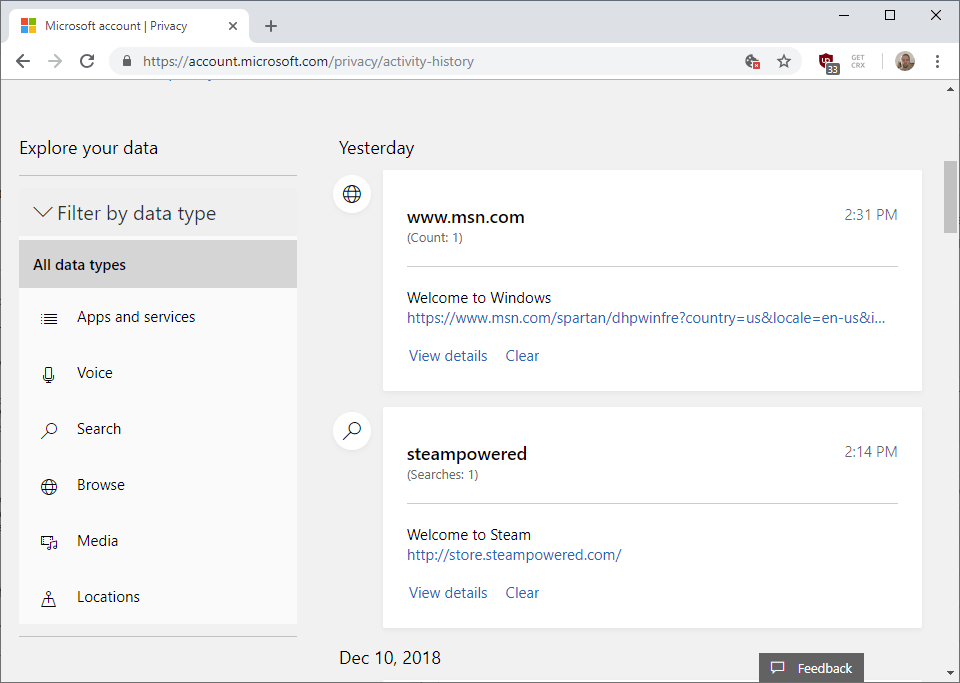
I verified the claim on a Windows 10 device. With Activity History disabled in the Settings application, Microsoft's Privacy Dashboard would still display records of activity on the device on which the change was made.
You can verify this as well by opening the Microsoft Privacy Dashboard website and selecting Activity History when it is loaded.
The disabling of Activity History in Windows' Group Policy did not change the collecting and display of data either.
- Visit Computer Configuration > Administrative Templates > System > OS Policies.
- Disable "Allow publishing of User Activities.
- Disable "Enables Activity Feed".
- Disable "Allow upload of User Activities"
The changes have no effect on the collecting and display of activity data on the Microsoft Dashboard website under Activity History.
Closing Words
The leaking of Activity History data even when the feature is disabled is likely an, admittedly, serious bug.
Ghacks needs you. You can find out how to support us here or support the site directly by becoming a Patreon. Thank you for being a Ghacks reader. The post Windows 10: Activity may be recorded even if you disable it appeared first on gHacks Technology News.
☛ El artículo completo original de Martin Brinkmann lo puedes ver aquí

No hay comentarios.:
Publicar un comentario